Hi guy's has anyone successfully used the css editor part of tinymce?
I'm using it to try to add a background picture to a block - Sometimes I get to see a part of it show up in the preview box so I know it's pointing to the correct folder but it never seems to save the image? I've also had problems before with this not saving the background colour however I would get around this by highlighting all the text and then changing the background colour.
Sadly that little trick isn't working for my background picture - Everytime I hit the apply/update then it just dissapears - Then when I check the html area it's blank.
Is this a known issue as It just seems faulty or do I have a corrupt tinymce?
Any ideas
Best wishes
Alan
|
It must be just me fighting with tiny on this issue - Could someone tell me what's the correct html code for putting a bg pic in the block please.
Also how would I go about adding a simple text scroll left right up down etc. to a block?
I have looked on the net for some simple html scroll effects but when I copy and paste the html to the block (in the html section) it never works for me.
Many thanks for your help and advice.
Best wishes
Alan
|
Hi guy's has anyone successfully used the css editor part of tinymce?
What's the "css editor" part?
My opinions expressed on this site, in no way represent those of Boonex or Boonex employees. |
Hi HL, It's a fair question.
Here's some screenshots that will describe it much better than words:
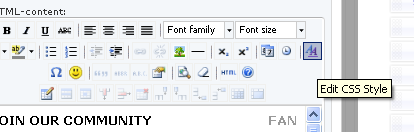
They are a part of the html blocks, well at least in my dolphin installation :-)
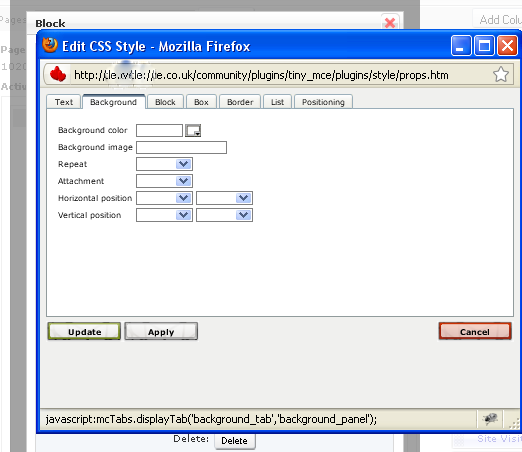
They are the two blue AAs. The above box is what you get when you click on it.
Hope this helps
Best wishes
Alan
|
OK... the style plugin.
Try replacing administration/js/page_builder_tiny.js with the one I've attached
My opinions expressed on this site, in no way represent those of Boonex or Boonex employees. |
That's great HL thanks for trying to help me out but sadly Im hopeless lol - Tried your update but it's still not working for me.
Do you have to tell it the size of the pic it's uploading through the style plugin? At the minute Im just putting in the path to the picture and this is all I'm getting:
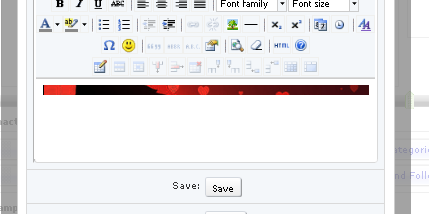
That red strip across the top is actually the part by her skirt and leg (tinymce is obviously a perv lol) of this pic below:

So Im wondering if I need to define the size - Also when I go to check the html it's always blank even after I save.
Once again many thanks
for your help
Alan
|
I forgot to mention, that after you make that change, you need to delete the files in the cache_public directory, and cache directory, or else you may not see the changes My opinions expressed on this site, in no way represent those of Boonex or Boonex employees. |
It seems as though overflow is hidden, so if that's all the height your page element has, that all the image you will see. Try adding more text.
For styling html block in page builder, you really should do this directly in the HTML popup. I don't even use TinyMCE in pagebuilder. I disabled it. It's a really clumsy way to add styling. It just gets in the way. My opinions expressed on this site, in no way represent those of Boonex or Boonex employees. |
Thanks HL for trying to help get me through this - Totally cleaned out (obliterated) the 2 cache directory's - What a load of files in there I think it needed a good clearout!
Just left .html access in cache - not sure if it's ok or not to get rid of it so I left it. Is it OK to delete this file or is it better left alone?
Still getting the problem with the background picture not showing and saving properly.
Thanks HL for your help
|
Your probably right HL and I will just use the html popup. Just got to figure out dolphin html!
Thanks a lot HL
Best wishes
Alan
|
That's probably for the better.... it's a useless plugin anyway. It's better, and easier, to just edit the html directly. My opinions expressed on this site, in no way represent those of Boonex or Boonex employees. |

