hi, how can i disable 2Checkout for the users?
i dont want that they sell and buy products with 2Checkout!
image: http://img40.imageshack.us/img40/9154/payments.gif
and i want that if somebody click on "settings", that the paypal-windows is open..
because i have than no 2checkout or something for choosing... ^^
any ideas, how to made it?
best regards!
2Checkout -> how to disable it?
 --- call me asa! ;-) |
Unless I'm missing something, this is built into the code. If you don't enter your information to activate a payment method, then it just lies dormant. |
hmm... how do you mean it? ^^ (my english isnt good. sry.) --- call me asa! ;-) |
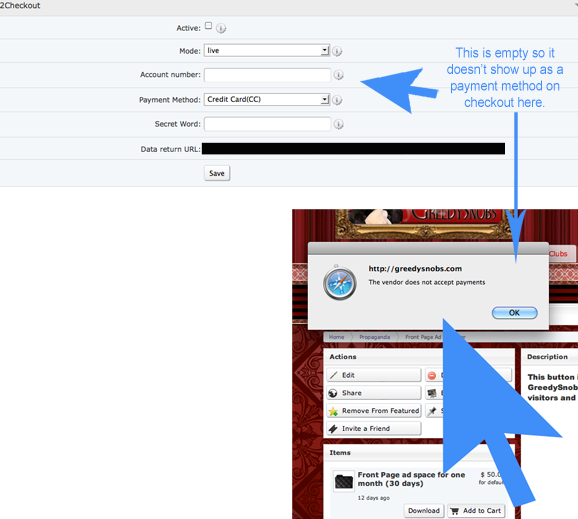
What I mean is that if you don't enter your information into the admin panel, then it shouldn't show up as a payment option for your users. So, while you can see it in on the server side, as long as you haven't filled out the form and as long as the button labeled "Active" isn't checked - you can't see it on the user side. I have both paypal and 2checkout in my admin panel, but I haven't enabled them so they don't show up when listing a store item and they don't show up when someone buys an item:
Have you test run selling and/or buying a product to see how it looks outside the admin panel? |
@ggsinc --- call me asa! ;-) |
open your database via phpmyadmin look for the table bx_pmt_providers click the red X next to 2checkout this will remove the option for 2Checkout payments site wide on all pages it was offered. https://dolphin-techs.com - Skype: Dolphin Techs |
thank you very much @dolphin_jay !! --- call me asa! ;-) |
i have found it self. ^^ --- call me asa! ;-) |
I don;t want to start a fight but why on earth would you favor Pay-ripmeoff-Pal over 2 checkout? http://towtalk.net ... Hosted by Zarconia.net! |
I don;t want to start a fight but why on earth would you favor Pay-ripmeoff-Pal over 2 checkout?
--- call me asa! ;-) |
I do understand you and point made.... http://towtalk.net ... Hosted by Zarconia.net! |

Below is the legacy version of the Boonex site, maintained for Dolphin.Pro 7.x support.
The new Dolphin solution is powered by UNA Community Management System.
The new Dolphin solution is powered by UNA Community Management System.